Read supported identity and tax records, business licenses, bank statements, credit agreements, valuations and insurance.
Confidence scores, side-by-side review and cross-document mismatch checks keep people in control. ID numbers always need human confirmation.
AI switched off? Keep working with OCR, rules and click-to-fill.
Your AI, your policy
Choose how each document type is read—not one rule for everything.
Decide per document type whether AI is used and select an approved OCR engine, your own data center or Google Document AI.
Two-person approval protects changes to your AI and OCR policy.
Smart search
Find the records behind a question.
Ask “loans with expired insurance in Wilmington” in your preferred supported language.
Refine editable filter chips. Results respect company permissions and encryption policy.
Credit Document Control Center
See missing evidence and exposure before exceptions grow.
Per-facility checklists, exception aging and escalation; exposure at risk by branch and relationship manager.
Collateral 360 and monthly exceptions reports give credit teams a connected view. Tested in Sandbox at 20,000 fictional facilities.
Pharma GxP pack
Keep Quality decisions traceable from SOP to inspection.
SOP lifecycle with Part 11-style e-signatures, a training gate, controlled copies with automatic recall and periodic review.
Inspection readiness, indexed inspection packs and time-limited read-only inspector links.
Validation pack: URS, risk assessment, IQ/OQ/PQ scripts, traceability and Part 11 / Annex 11 / ALCOA+ evidence mapping. Supports your qualification work; does not certify compliance.
Corporate registers
Bring obligations, property and financial exposure into one view.
Inward/outward correspondence, contract financial exposure, insurance and property/asset registers.
Property records retain jurisdiction-specific details. Group views respect each company’s permissions.
Microsoft 365
Connect familiar tools to governed records and decisions.
Entra ID single sign-on and automatic user provisioning with SCIM.
Teams notifications, Save from SharePoint/OneDrive and an Outlook add-in. Customer tenant setup and permissions required.
Security & trust
Keep control of access, keys and the evidence behind every action.
Per-company encryption policies, AWS KMS keys with independent key-custodian approval, read-only access and two-person controls.
Tamper-evident audits include print/export logging; nightly encrypted archives use the customer’s own password.
Integration DNS checks and an OWASP ASVS L2 pen-test evidence pack support security review—not a certification or a completed external penetration test.
Revocation stops future access. Downloaded copies cannot be recalled; recorded copies remain traceable by their watermark ID.
Security is core. Not an industry add-on.
Control that stays with the record.
01
Document Security
Give people the access they need—not a copy they do not.
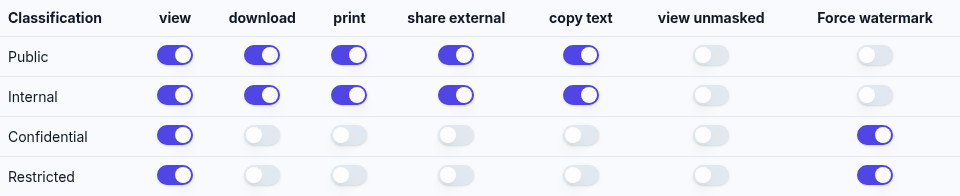
Separate view, download, print, external-share and copy rights by classification, role or user, with folder inheritance and document overrides.
A secure canvas viewer carries name, email, company, IP and company-local time. Server-stamped PDF downloads and prints add a unique copy trace ID.
Viewer controls reduce casual copying; no browser can prevent screenshots or recall an already downloaded copy.
02
Access policies
The right person. The right place. The right time.
Apply approved hours, office-network IP restrictions, approved devices and document validity dates.
Reasoned break-glass access leaves audit evidence. A policy simulator checks a user, document, time and IP before policy changes.
03
Secure Share
Send a controlled invitation, not an unrestricted attachment.
Named external recipients verify an email one-time code each session. Set view, download and print rights, expiry and open limits; require approval for selected classifications.
Track opens, last access and recipient status. Revocation blocks the next authorised request; “sent to wrong person” recovery records an incident and notifies the owner.
04
Revocation & offboarding
End access while keeping the evidence.
Confirmed actions revoke a document’s external shares and non-owner grants, offboard a user or end access across a project, with counts before confirmation.
Transfer ownership and eligible shares when offboarding. Already downloaded copies cannot be recalled; recorded copies remain traceable by watermark ID.
05
Classification & masking
Make sensitive information visible to policy—not to everyone.
Configure labels and detectors for supported national-ID, tax-ID and phone formats, Luhn-valid cards, configurable account patterns, email and custom keywords. Format coverage is configurable, not universal identity verification.
After approved OCR/text extraction, rules can apply rights, force watermarks and request per-file encryption, subject to existing policy and key-custodian approval.
Users without unmasked rights receive a masked rendition where detections and positions are available. Missing required masking evidence blocks access; only detector types and counts are retained.
06
Security Risk Center
Turn document activity into a focused review queue.
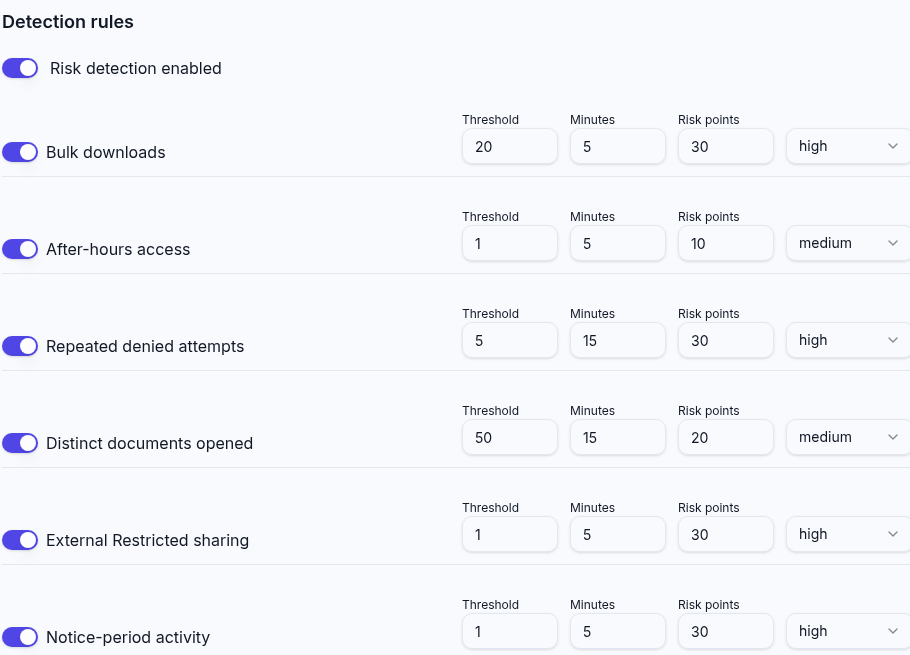
Company-configurable rules evaluate bulk downloads, after-hours access, repeated denials, unusual document opens, Restricted sharing and notice-period activity every 15 minutes.
Review decaying user risk scores, findings by department and event timelines. High-severity alerts target designated security officers; delivery requires configured services.
07
Retention & recovery
Preserve the original. Restore without rewriting history.
Re-upload and restore append new versions. History shows who, when and size; retention schedules and reasoned document/folder legal holds block deletion and version pruning.
A configurable recycle bin and administrator re-authentication govern permanent deletion. Retained originals and legal holds remain protected.
Coming soon: an S3 destination with Object Lock retention. Configuration only—not connected, and not an active immutable backup service.
08
Company-controlled platform
Your workspace, your providers, your evidence.
Daily per-company encrypted backups keep companies separate and retain archives for 30 days. An archive password is required; authorised exclusions and governed restore apply.
Bring your own Claude or Gemini keys. AI usage is billed by your AI provider to your own account, with company usage history and per-user/company request limits. OCR and disclosure policies still apply.
VisionX-signed editions and add-ons support online checks and offline license files; enforcement remains off during the current rollout. SSO follows the configured identity provider, with company approval required.
Hardened exports neutralise spreadsheet formulas; uploads validate allowed content and size. File and email limits vary by channel.
Features shown reflect the prepared November 2026 release, not a claim of deployment to every workspace. Availability depends on approved policies, connected providers and licensed features. S3 immutable backup is coming soon; licensing enforcement remains off during rollout. Usage quantities are set by the signed license; no public price is quoted.
Inside Vaulteer
Real controls. Clear decisions.
Real app screens from an isolated TEST workspace. Fictional configuration only; no customer records.
Classification-based rights and forced watermarks.Company-configurable thresholds, time windows and risk points.
Industry packs require both Professional-or-higher industry access and the relevant signed add-on. AI billing stays with your provider; AI features retain their licensed permissions. User quantities and other limits follow your license. Enforcement remains off during rollout.